

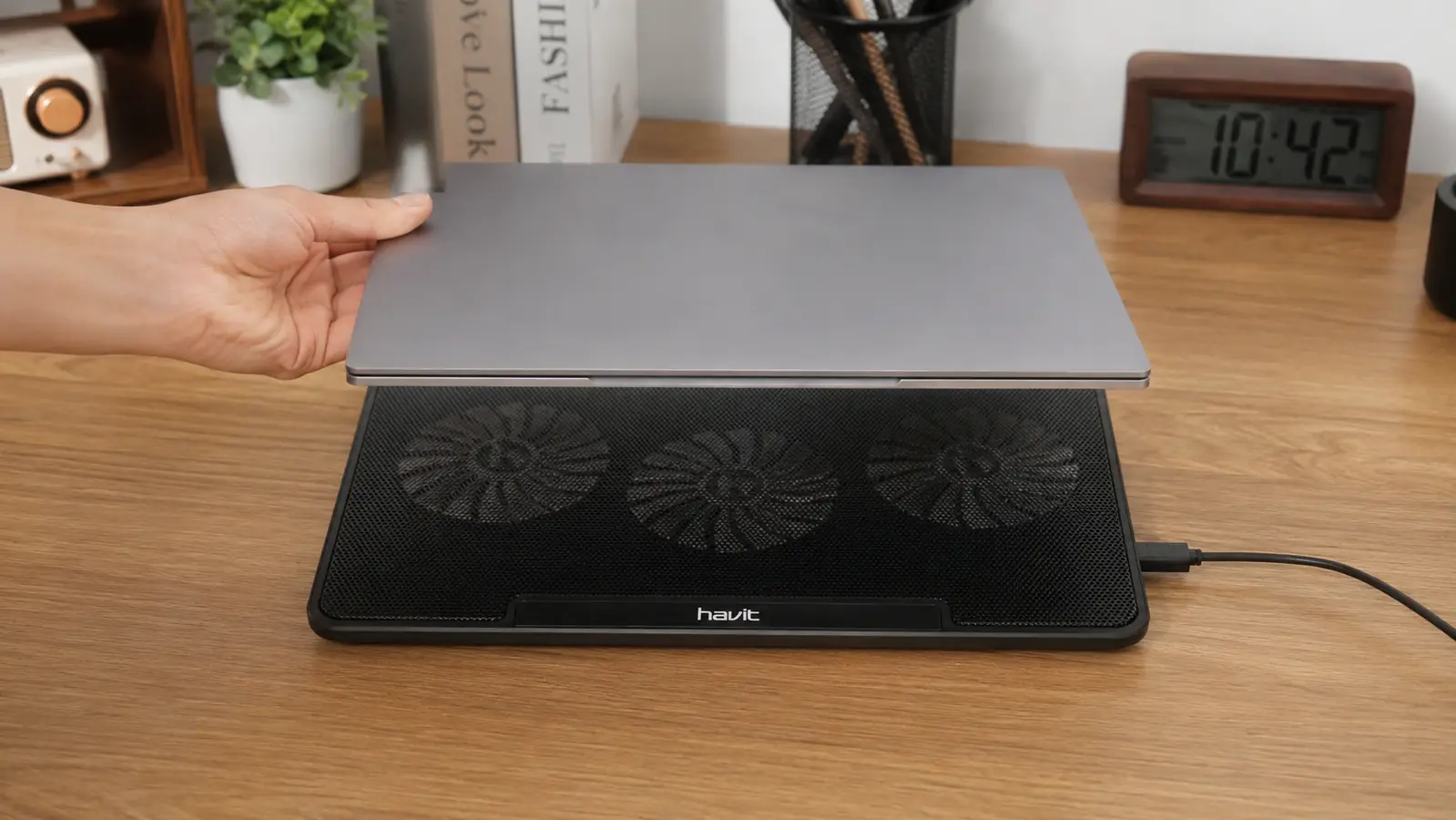
A laptop sitting flat on a desk is doing itself no favors. The intake vents on the bottom get partially blocked by the desk surface itself, the internal fan has to work harder to pull in air, and on a long video call day that adds up to a hot chassis, a loud fan, and eventually a laptop that slows down right when you need it most. I've run a Havit HV-F2056 cooling pad under my own work laptop for months now, and it's one of the few pieces of desk gear that actually earns its keep every single day instead of sitting there looking nice. Here are 10 real reasons it belongs under a work laptop, not just a gaming rig. Most people never notice the problem until a coworker asks why their laptop sounds like it's about to take off, or until a call starts lagging right when it matters.
Tired of your laptop fan drowning out your own voice on calls?
The Havit HV-F2056 is the pad I reach for every workday. Three fans, USB powered, and it's kept my laptop out of the danger zone for months. Check today's price on Amazon.
Amazon Check Today's Price on Amazon →It Keeps Your CPU Out of Thermal Throttling Range
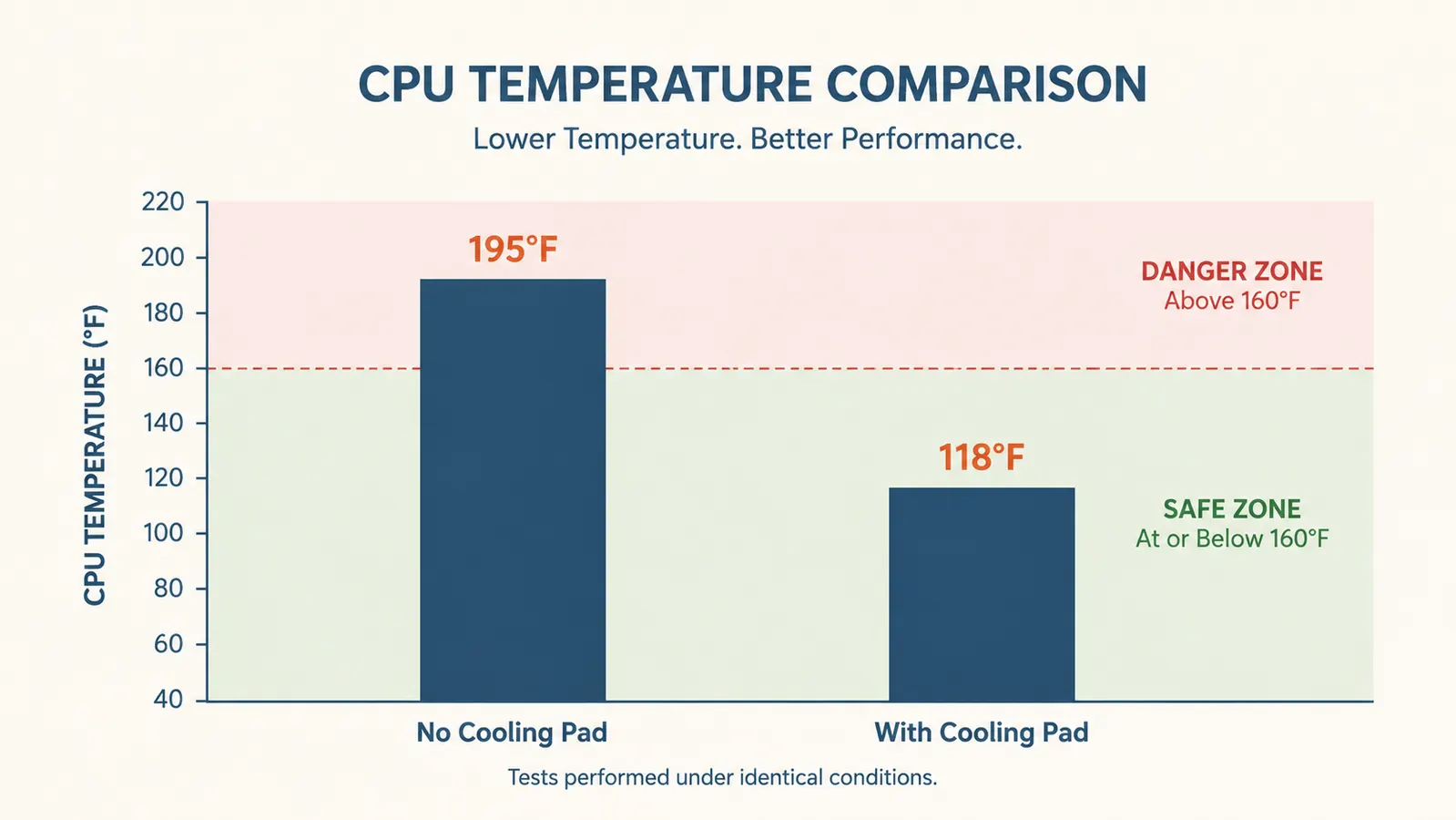
When a laptop chip gets too hot, it slows itself down on purpose to avoid damage. That's thermal throttling, and it shows up as a laggy cursor or a video call that starts stuttering around the 45 minute mark. My laptop used to sit in the low 90s Celsius under a normal workday load. With the Havit's three fans pulling air across the bottom vents, that same workload now tops out closer to the high 70s or low 80s. That gap is the difference between a laptop that keeps up and one that quietly gives up on you mid-task.
It Quiets Down Your Laptop's Own Internal Fan
A hot laptop runs its internal fan harder to compensate, and that fan is almost always louder and whinier than a purpose-built cooling pad on a low or medium setting. Once the HV-F2056 is doing the heavy lifting, my laptop's own fan barely spins up at all during calls. The pad's fans on low are quieter than my laptop's internal fan under load, so the net noise on a call actually goes down, not up, which surprised me the first time I noticed it.
It Protects Your Laptop's Lifespan
Heat is one of the fastest ways to age a laptop's internal components, from the battery to the solder joints on the motherboard. A machine that regularly runs hot tends to develop battery swelling, fan bearing wear, and general slowdown years before it should. Running a laptop cooler on a daily basis isn't going to make it last forever, but it removes one of the biggest stressors a work laptop faces during a normal eight hour day, and that adds up over a couple years of ownership.
It Prevents Mid-Call Shutdowns and Freezes
A laptop that overheats badly enough won't just slow down, it can freeze entirely or force a shutdown to protect itself, which is a rough way to end an important meeting. Once I started running the cooling pad every day, the random freeze-ups that used to happen maybe once every couple weeks stopped showing up at all. It's not dramatic, it's just one less thing that can go wrong at the worst possible moment. I'd rather deal with a slightly louder desk than lose a laptop mid-presentation in front of a client.
It Raises Your Laptop to a Better Camera Angle
The HV-F2056 has a basic two-position flip stand, and even the lower setting tilts a laptop up enough to change your camera angle for the better. Instead of the classic looking-down-your-nose webcam shot, the slight lift puts the camera closer to eye level. It's a small thing, but on a day full of video calls, a better angle makes a real difference in how a meeting comes across.
It's Powered by the Laptop Itself, No Charging Required
The pad runs off a single USB cable that plugs straight into the laptop, so there's no battery to remember to charge and no separate wall adapter to keep track of. Plug it in when you sit down, unplug it when you're done. For anyone who already has too many chargers cluttering a desk or a laptop bag, that simplicity matters more than it sounds like it should.
It Travels Well for Hybrid and On-the-Road Work
At 15.4 by 11.4 inches and under two pounds, the HV-F2056 folds flat and slides into a laptop bag without adding much bulk. I've taken mine on a couple of work trips and it hasn't been a hassle to pack. If your work laptop moves between a home office, a coffee shop, and a hotel desk, having a cooling pad that travels as easily as the laptop itself is worth more than one that only makes sense bolted to a single desk.

It Keeps Vents Clear of Desk Clutter and Dust
A laptop sitting flat on a desk pulls dust, crumbs, and lint straight into its bottom vents, especially in a home office that doubles as a kitchen table. Elevating the laptop on a mesh surface keeps it off the desk itself and lets air move underneath instead of getting trapped against a flat surface. It's a small change that means less dust buildup inside the machine over time, which is one more thing protecting those internal fans.
It Handles Multitasking Without Melting Down
Running Teams, a browser with a dozen tabs, and a second monitor at the same time is normal for a lot of remote jobs, and it's exactly the kind of load that pushes a laptop's internal cooling past its limit. The extra airflow from the pad's fans gives the laptop enough headroom to handle that kind of daily multitasking without the fan screaming or the machine slowing to a crawl right when three things are happening at once. That kind of headroom matters most on the days when everything happens at once, not on the easy days when it wouldn't have mattered anyway.
It's a Low-Cost Fix Compared to the Alternative
A work laptop that overheats badly enough eventually needs a fan replacement, a battery replacement, or a full swap, any of which costs a lot more than a cooling pad. At under 30 dollars, the HV-F2056 is cheap insurance against exactly that outcome. It's the kind of purchase that doesn't feel exciting at checkout but pays for itself the first time it saves you from a shutdown during a meeting that actually mattered.
What I'd Skip
Not every laptop needs this. If yours already runs cool, some thin ultrabooks with low-power chips genuinely don't get hot enough for a cooling pad to matter, you're not missing much by skipping it. And if you need dead silence for sensitive audio work, even the low fan setting might bother you in a truly quiet room. For everyone else running video calls and multitasking through a normal workday, it's a cheap fix for a real problem, not a gadget you'll forget you own. Desk space is the other real tradeoff. The pad does take up more footprint than a bare desk, so if you're already tight on space, weigh that before adding one more thing to the setup.
It's not glamorous desk gear. It just quietly keeps your laptop from working against you all day.
Stop letting your laptop overheat through every call.
The Havit HV-F2056 is a simple, low-cost way to keep your work laptop cool and quiet during long days. Check today's price on Amazon.
Amazon Check Today's Price on Amazon →